My PC Direct opens a direct, encrypted Remote Desktop and file-sharing channel between your own computers. No servers and no one in the middle: your PC is the service.
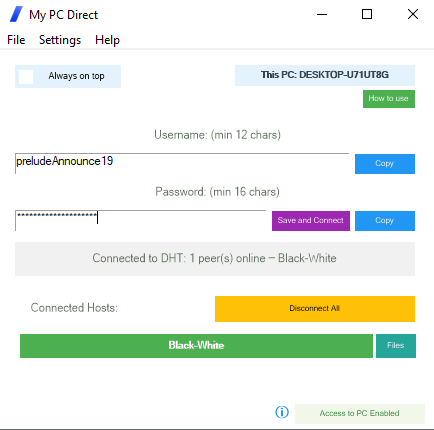
No sign-up and no router settings. Install it on each computer you want to reach, and give each one the same credentials.
Type a user name of your choice, 12 characters or more (an e-mail address works, and is not shared with anyone), and a password of 16 characters or more.
Click Save and Connect, and the PC joins the network of peers.
Use the same credentials on each computer. They locate each other and open a direct, encrypted channel, and each one found is shown in green.
Remote Desktop sessions then open on your own computer at localhost with a port
chosen at random, and travel through the encrypted channel to the other PC. Shared folders on
your connected PCs open in Windows Explorer through the same channel.
All core features are free. Your PC already has the internet connection it needs, and no third party is involved.
True peer-to-peer connectivity. No servers, no intermediaries and no third parties involved in setting up your connection.
Self-reliant by design: your own PC provides the service, with no dependency on a company, an outside service or a provider.
End-to-end encryption, designed so that no third party can monitor, intercept or record what passes between your computers.
A small download that runs straight away, without administrator rights, and works in most network situations, including over a VPN.
Connect to your home PC over the internet with no port forwarding and no router settings. Modern peer-to-peer techniques take care of it.
Remote Desktop to your other PCs, and optional access to their shared folders straight from Windows Explorer — free as well.
When a remote-desktop session passes through a company’s servers, that company has the technical means to see it — and so does anyone who breaks into it. My PC Direct removes the middleman: the connection runs straight from one of your PCs to another, encrypted with keys that exist only on your own devices.
There is no server to hack, no employee with access to your sessions, and no data-centre staff who could intercept your traffic.
Trusting the company does not remove the risk built into its design. If a service can reach your session, so can anyone who compromises that service.
| My PC Direct | Services that relay through their servers | |
|---|---|---|
| Where your session goes | Straight from one of your PCs to another | Through the provider’s servers |
| Who could see your screen | No one in between | The provider, its staff, its data centre, and anyone who breaches them |
| Account | None — credentials you create | An account with the provider |
| Cost | Core features free | Subscription fees for relaying your own connection |
| If the company changes course | The peer network carries on — it has no owner | Terms, prices or the service itself can change or end |
Through a compromised provider, an attacker could capture every keystroke, mouse movement and clipboard, screenshots and recordings, transferred files and print jobs, and whatever is on screen — passwords as you type them, banking, medical records, documents, messages and browsing. With My PC Direct there is no central point where any of it could be captured.
localhost with a port chosen at random (for example localhost:52847). That port forwards through the encrypted channel to the Remote Desktop service of the other PC, so its real Remote Desktop port is not opened to the internet for port scanners to find.One setup file for Windows 10 and 11. Install it on each computer you want to reach, and connect them with the same credentials.
The installer is not code-signed, so Windows SmartScreen or your antivirus may show a warning. Click More info, then Run anyway.
Each one does a single job properly, in the same plain language, under the same license, with no accounts anywhere.
Reads the drive’s own file table instead of walking folders, so the whole disk appears quickly, sorted by size. Delete, move and rename from the same window, with a running total of the space reclaimed.
Visit claimdisk.com →Shows the devices on your network in about thirty seconds, explains in plain English what is wrong, and fixes it in one click — with a link straight to your own router’s security advisories and firmware.
Visit lanfixer.com →Draws the connections your PC makes on a map of the world, shows which program made it, and lets you block an address, a region or a whole country that has no business being there.
Visit mapblocker.com →Send a file straight to someone, computer to computer, with nothing stored in between. Use it in a browser, or install the app to send much larger files.
Visit filesender.io →Hand a whole gallery of photos and videos to family directly from your computer, using one-time codes that expire on their own and can be revoked at any moment.
Visit sending.pics →Paste an email header to trace where the message really came from — every hop, by country and address — and decode what the obscure header codes actually mean.
Visit headerscanner.com →Send a private message as a link that can be opened once and then disappears.
Visit textme.im →Start a private conversation from a single link, encrypted in the browser rather than on a server, with no account and no registration for either side.
Visit instachat.im →A one-time encrypted conversation that opens from a link. No registration and no history.
Visit protected.chat →Free for personal use, all of them. Business, government and non-profit use begins with a free two-week trial.
